

USB technology is widely used today, making it easy to connect, charge, & transmit data between devices.
USB technology has become a crucial component of modern gadgets, ranging from laptops and smartphones to gaming consoles & storage drives.
Understanding different USB kinds can help you choose the correct connection and device for your setup, whether you're charging your phone, transferring files, or seeking the best pen drive for daily storage.
Different USB connectors affect charging speed, data transfer performance, & overall device compatibility.
In this article, we'll go over the most popular USB types, their applications, distinctions, and why they are important in everyday computing.
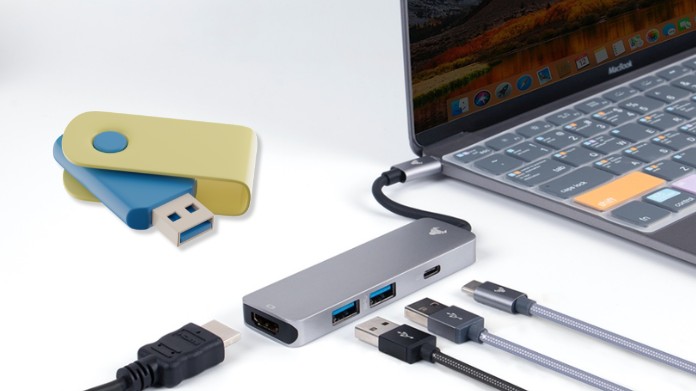
USB stands for Universal Serial Bus. It is a standard for connecting devices, transmitting data, and powering electronics. USB technology has progressed greatly since its introduction in the 1990s, with higher speeds, smaller ports, and enhanced charging capabilities.
Because of its ease of use and compatibility, USB has emerged as a universal solution for both personal and professional technological settings.
Today, USB is used in:
Smartphones
- Laptops and PCs
- External storage devices
- Gaming accessories
- Printers and cameras
- Audio devices and more
Many individuals purchase cables or accessories without confirming the USB type, which can lead to compatibility issues. Different USB connectors provide varying speeds, charging capabilities, & functions.
Knowing the correct USB type helps you:
- Choose compatible devices
- Improve charging performance
- Transfer files faster
- Avoid buying the wrong cable
- Connect modern and older devices properly
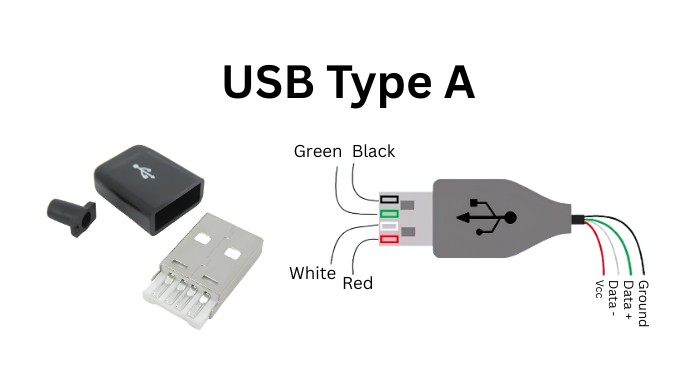
USB Type-A is the standard rectangular USB connector that most people recognize. It has long been one of the most popular USB connectors due to its broad compatibility with a variety of devices. USB Type-A connectors are still available on many computers, televisions, game consoles, & chargers today.
Features:
- Rectangular shape
- Usually found on computers and chargers
- Supports multiple USB standards like USB 2.0 and USB 3.0
- Commonly used with flash drives and peripherals
Although newer devices are switching to USB-C, Type-A ports remain popular because they are compatible with older accessories.
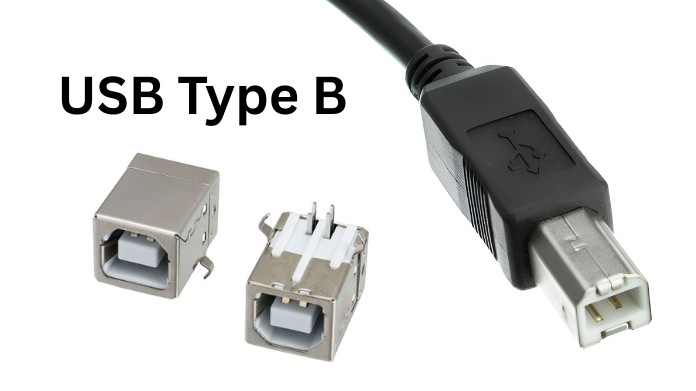
USB Type-B connectors are typically utilized with larger devices such as printers and scanners. These connectors are primarily intended for sturdy connections in the workplace and professional equipment. Type-B connectors are more square-shaped than other USB connectors, making them easier to detect.
Features:
- Mostly used in printers and office devices
- Larger and more durable connector
- Often paired with USB Type-A cables
Even as wireless printing becomes increasingly popular, many office devices continue to rely on USB Type-B connections for reliable communication.
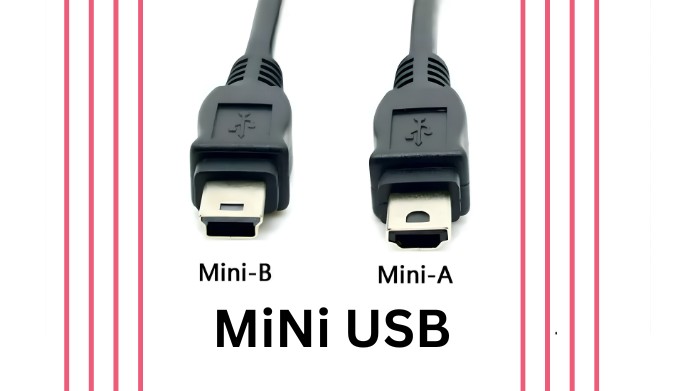
Mini USB was commonly used in MP3 players, portable devices, and older digital cameras before Micro USB became the standard. Although it is less common now, some older devices still use this connector for charging and data transfer. In the early stages of portable electronics development, it was essential.
Features:
- Smaller than USB Type-A and Type-B
- Common in older portable electronics
- Rarely used in modern devices
Mini USB may still be encountered when using older devices or legacy tech equipment.
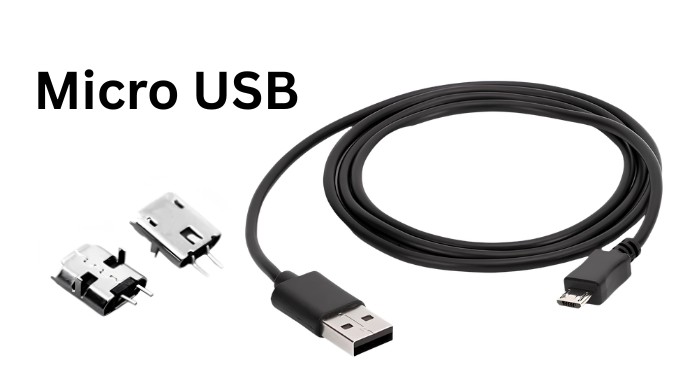
Micro USB became incredibly popular among Android smartphones & portable gadgets for many years. It was widely embraced due to its small size and cost-effective implementation in mobile devices. Even today, many low-cost electronics and accessories employ Micro USB ports.
Features:
- Compact connector for mobile devices
- Widely used before USB-C
- Supports charging and data transfer
- Available in USB 2.0 & USB 3.0 variants
Many low-priced electronics and accessories continue to use Micro USB because of its low cost & widespread availability.
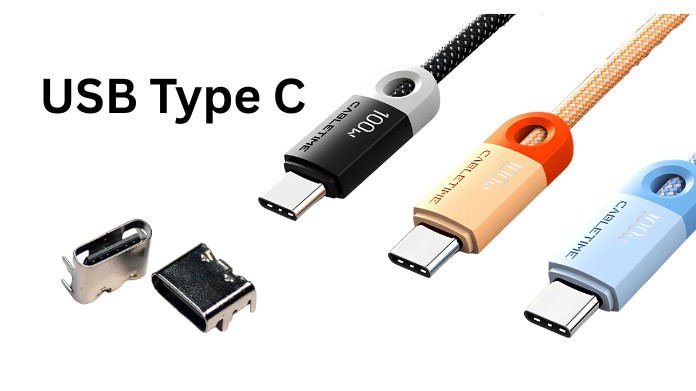
USB Type-C, also known as USB-C, is the newest and most advanced USB connector used in modern devices. Its reversible construction and high-speed capabilities have led several manufacturers to select it. With just one connection, USB-C can also manage charging, data transfer, and video output.
Features:
- Reversible connector design
- Faster data transfer speeds
- Supports fast charging
- Can transmit video and audio signals
- Used in phones, laptops, tablets, and gaming devices
USB-C is quickly becoming the universal standard since it blends speed, simplicity, and power transfer in a single connector.
Besides connector shapes, USB also has different speed standards.
USB Standard Maximum Speed Common Usage
USB 2.0 480 Mbps Basic accessories and older devices
USB 3.0 5 Gbps External drives and faster transfers
USB 3.1 10 Gbps Modern storage and high-speed devices
USB 3.2 Up to 20 Gbps Advanced peripherals
USB4 Up to 40 Gbps High-performance devices and displays
Higher USB standards significantly improve file transfer speed and device performance.
A common mistake is confusing the USB type with the USB version.
- USB Type, which includes USB-A and USB-C, describes the connector geometry.
- USB Version refers to the speed and technology standards, such as USB 2.0 or USB 4.
For instance, depending on the cable & device requirements, a USB-C cable may support USB4 or USB 2.0 speeds.
The best USB type depends on your device and usage.
- Fast charging
- Modern laptops and smartphones
- High-speed data transfer
- Video output and docking stations
- Older devices
- Flash drives
- Standard computer accessories
- Budget electronics
- Older Android devices
- Portable accessories
Understanding the various USB kinds can save you time, money, & compatibility concerns. From the traditional USB Type-A connector to the cutting-edge USB-C connector, each USB type serves a distinct purpose based on the device and performance requirements.
As technology advances, USB-C is projected to dominate future gadgets due to its speed, versatility, and convenience. However, older USB types are still helpful for legacy hardware and common accessories.
About the Author
Hello, my name is Bran Bolton, and I'm a computer enthusiast and web developer who enjoys discovering and describing modern technologies in simple terms.
I hope this guide helped you understand the many USB types and their applications.
Understanding USB standards and connectors will help you choose compatible devices, cables, and accessories for daily usage.
Reference:
explainerguy01. (2025, December 17). Every USB type explained in 14 minutes [Video]. YouTube. https://www.youtube.com/watch?v=kx3otLs0AnM
